On this page
At a campsite at dusk, the panels have caught sun all day, the phone is dead, and the battery bank is the only power left. How does a charge controller work? It sits between the panels and the battery, turning the panels’ raw power into a charge the battery can take, and it stops the battery from overcharging once it is full. The steps below follow the power from the panel to the battery, with the figures the makers state for each part of the job.
SolarKitHQ earns a commission when you buy through links on this page, at no extra cost to you. As an Amazon Associate I earn from qualifying purchases. Affiliate disclosure.
How does a charge controller work: the quick answer
A charge controller takes power from the panels, matches it to the battery, and watches the battery so it never overcharges. A panel makes power at a voltage that moves with the sun, while a battery needs a steady charge at its own voltage, so the controller sits in the middle and fixes the mismatch. It also stops the battery from feeding power back to the panels at night, and it moves through charge stages as the battery fills. MPPT and PWM controllers do this job, and the difference is how they handle the gap between panel voltage and battery voltage.
Step 1: Match the panel voltage to the battery
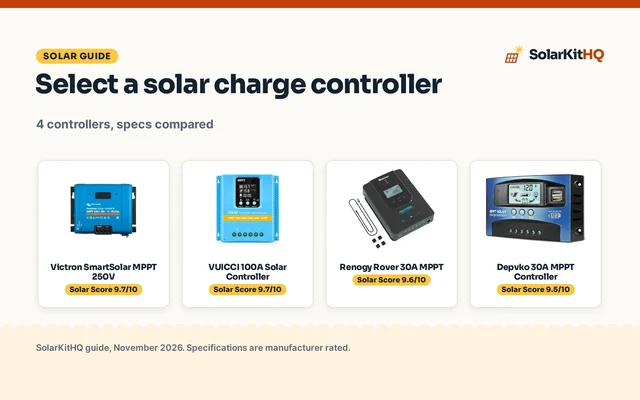
A panel and a battery rarely sit at the same voltage. A panel’s voltage rises and falls with the sun, while a battery bank holds a set voltage, and the controller bridges the gap. The Victron SmartSolar MPPT 100V 30 amp controller takes up to 100V from the panels and charges a 12V or 24V battery, and the PowMr 60A controller takes up to 160V and charges a 12V, 24V, 36V or 48V battery. That spread is the point: the controller accepts the panel’s higher voltage and delivers it at the voltage the battery needs, so the panel and the battery never have to match each other directly.
| Controller | Max panel volts | Charge amps | Battery volts |
|---|---|---|---|
| Victron SmartSolar MPPT 75V 15A | 75V | 15A | 12V or 24V |
| Victron SmartSolar MPPT 100V 30A | 100V | 30A | 12V or 24V |
| Victron SmartSolar MPPT 150V 45A | 150V | 45A | 12V, 24V, 36V or 48V |
| PowMr MPPT 60A | 160V | 60A | 12V, 24V, 36V or 48V |
Read the max panel volts and the charge amps as limits, not targets: the panels you connect must stay inside them. See the solar charge controller size guide for how to match a controller to a panel set.
Step 2: How MPPT finds the most power
MPPT stands for maximum power point tracking, and it is the method the Victron SmartSolar and PowMr controllers (on Amazon) use. A panel has a point where it makes the most power, and that point moves as the sun and the temperature change, so the controller keeps searching for it and holds the panel there. The PowMr 60A controller states maximum efficiency of at least 98.1 percent and PV utilization of at least 99 percent, which is the maker saying how much of the panel’s power reaches the battery. A PWM controller works differently: it connects the panel straight to the battery, so the panel runs at the battery voltage and any extra voltage above it goes unused. See the MPPT vs PWM charge controller comparison for the full side-by-side.
Step 3: The charge stages
A controller does not push the same charge all the way to full. It moves through charge stages, and the Victron controllers switch through different charge stages while multiple controllers can synchronize and behave as one. The stages have names the makers use: bulk, when the battery takes all the charge the panels can give; absorption, when the controller holds the voltage steady while the battery tops up; and float, when it holds a lower voltage to keep the battery full without overcharging it. The PowMr 60A controller lets you set the absorption voltage, the floating voltage and the low voltage disconnect, and it fits lead-acid and lithium batteries, including LiFePO4. For lithium, the maker says manual parameter adjustment is needed, because a 12V lithium battery may range from 11.1V to 14.8V, so the settings must match the battery’s actual voltage. See the LiFePO4 battery charging chart for the voltages by stage.
Step 4: Size the controller to the system
Pick a controller by its limits, not by its brand. The charge amps must cover the current the panels can send, and the max panel volts must cover the voltage the panels can reach. Charge amps run from 15A to 60A and max panel volts from 75V to 160V across the Victron and PowMr controllers: the Victron 75V 15A, the Victron 100V 30A, the Victron 150V 45A and the PowMr 60A at 160V. A controller that is too small for the panels wastes power on bright days, and one whose max volts sit below the panel voltage risks damage, so check the panel figures against the controller’s limits before you buy. See the solar charge controller size guide for the matching steps.
Ways to get more from the controller
- Watch the charge from your phone: the VictronConnect app shows real-time data and 30-day performance history, so you can see what the panels gave and what the battery took without walking to the controller.
- Let controllers work together: multiple Victron SmartSolar controllers can synchronize and behave as one, switching through the charge stages together for system-wide energy optimization.
- Keep the controller cool: the PowMr 60A fan starts when the temperature passes 45℃ and stops below 40℃, and the controller comes with a plug-and-play temperature sensor, so keep air moving around the controller and use the sensor the maker includes.
- Read the display: the PowMr backlight LCD shows PV voltage, output power, battery voltage, charging current, working mode and temperature, so a quick look tells you whether the system is charging or standing still.
- Use the load output: the Victron load output powers devices directly from the solar charger and disconnects the load if the battery voltage drops too low, which keeps a small load from draining the battery overnight.
FAQ: power away from the grid
What is a solar controller?
A solar controller, or charge controller, sits between the panels and the battery and manages the charge. It matches the panel power to the battery voltage, moves through the charge stages as the battery fills, and stops the battery from overcharging. Every panel-to-battery setup needs one, because a panel wired straight to a battery would keep pushing power after the battery is full.
What is the difference between MPPT and PWM?
MPPT tracks the panel’s maximum power point and turns extra panel voltage into charging current, while PWM connects the panel straight to the battery at the battery voltage. MPPT suits larger setups where the panel voltage sits well above the battery voltage, and PWM suits smaller setups where the panel voltage sits close to the battery voltage. See the MPPT vs PWM charge controller comparison for the full side-by-side.
Do I need a charge controller for a small panel?
Yes, if the panel charges a battery. A charge controller is the part that stops the battery from overcharging, so a panel without one keeps pushing power after the battery is full. The only setups that skip a controller are panels that feed a load directly with no battery in the middle, and those are rare in a home or RV setup.
What size charge controller do I need?
Match the charge amps and the max panel volts to the panels you own. Victron and PowMr controllers run from 15A to 60A and from 75V to 160V, so add up the panels on the roof or the ground and pick a controller whose limits sit above them.
Related solar guides
See the how to set a solar charge controller, the solar charge controller vs battery charger, the best MPPT charge controllers for a shed and the best MPPT charge controllers for a boat.