
On this page
On a still evening at the cabin, with the power station on the porch running the lights and the ceiling fan turning overhead, the question that comes up is how much energy do ceiling fans use. A ceiling fan uses a small amount of energy next to the heavy loads in a home, and the exact draw depends on the fan and the speed setting, so the honest answer for a given fan comes from measuring it. A plug-in watt meter between the fan and the outlet gives that reading.
SolarKitHQ earns a commission when you buy through links on this page, at no extra cost to you. As an Amazon Associate I earn from qualifying purchases. Affiliate disclosure.
The quick answer
How much energy do ceiling fans use comes down to watts on the meter and kilowatt-hours over time. The fan draws power in watts while it runs, and the meter adds those watts up into kilowatt-hours across the hours it runs. A plug-in meter shows these figures, so a short reading at each speed setting gives a clear picture of the fan on its usual setting. The meters in the gear section read power, energy, volts, amps, hertz, power factor and cost.
How much energy do ceiling fans use
The draw of a ceiling fan sits at the low end of household loads. A fan is a small motor moving air, so it draws far less power than heating, cooling or cooking loads, and the reading on the meter stays modest at every speed setting. Speed is the main lever: a higher speed setting draws more watts than a lower setting, and the meter shows the change as the setting moves. Size and motor design move the figure too.
How to measure a ceiling fan with a plug-in watt meter
Plug the meter into the outlet, then plug the fan into the meter. Move the display to watts and note the reading at the speed setting the fan usually runs on, then move to kilowatt-hours and leave the meter in place while the fan runs. The data memory in these meters keeps the figure when the meter is unplugged or the power fails, so the reading can be checked after the run.
Before measuring, set the overload limit the way the maker describes. The MECHEER meters state a default overload power of 3680W, adjustable from 0 to 3680W, and the maker says to set it to 1800W before using, by pressing the function button for more than 3 seconds on the single meter and the MODE button for more than 3 seconds on the 2 pack. The HBN meter (on Amazon) states a maximum capacity of 15A and 1875W at 125VAC and 60Hz.
The gear for measuring a ceiling fan
Measuring the fan is the step that turns a guess into a reading, and each meter below handles that measurement with a different set of display modes and limits.
| # | Product | Solar Score | Buy |
|---|---|---|---|
| 1 | 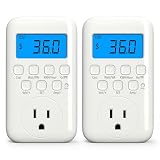 HBN Watt Meter 2 Pack | 9.7/10 | Buy on Amazon |
| 2 |  MECHEER Watt Meter 2 Pack | 9.6/10 | Buy on Amazon |
| 3 |  MECHEER PM01 Watt Meter | 9.6/10 | Buy on Amazon |
| 4 | 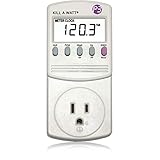 P3 P4400 Kill A Watt | 9.5/10 | Buy on Amazon |
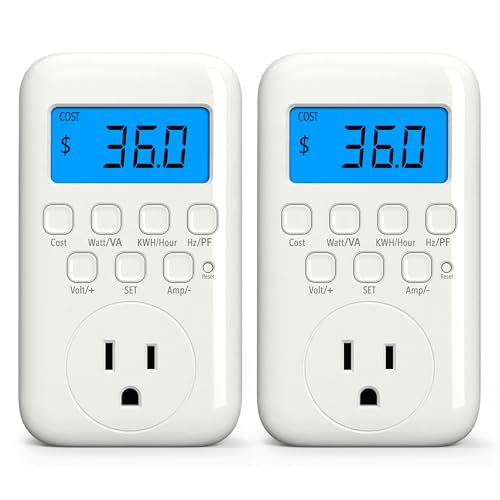
HBN Watt Meter 2 Pack
2 plug-in meters with a backlit display, 9 display modes and a 15A and 1875W maximum capacity for measuring a fan.
Pros
- 9 display modes cover power, energy, voltage, current and power factor
- Backlight turns off after 15 seconds of inactivity
- 2 meters in the pack, so another appliance can be measured at the same time
- Data storage keeps non-real-time data through a sudden power outage
Cons
- The 2.68 by 1.47 by 4.72 inch body takes up room on a crowded outlet strip
- The backlight turns off after 15 seconds, so a dark room needs a button press
- A 2 pack leaves a spare meter when a single fan needs measuring
- Rated at 125VAC and 60Hz, so it suits US household outlets only
Detailed Review
The maker lists 9 display modes covering power in watts, apparent power in volt-amps, energy in kilowatt-hours, usage time, frequency, power factor, voltage, current and electricity cost, changed with a single button. The backlit display offers a 160 degree wide viewing angle and turns off after 15 seconds of inactivity. Rated at 125VAC and 60Hz with a maximum capacity of 15A and 1875W, it stores non-real-time data through a sudden power outage and resets cumulative data when the reset button is held for 3 seconds.
Who it's for: homes measuring a ceiling fan alongside another appliance, where 9 display modes and a 2 pack earn their keep. Who should skip it: buyers who want overload protection stated.
Its Solar Score of 9.7/10 comes from performance 30/35, build 21/25, value 21/25, safety 7/10 and warranty 3/5: 82 of 100 points, placed on our 9.2 to 9.8 scale.
Key Specifications
| Display modes | 9 modes |
|---|---|
| Maximum capacity | 15A, 1875W |
| Rated voltage | 125VAC, 60Hz |
| Size | 2.68 x 1.47 x 4.72 in, 2 Pack |
Taken from the seller's listing on 19 November 2026. Capacity and output figures are rated by the manufacturer.
Safety and Warranty
What this listing states. Maximum capacity of 15A and 1875W at 125VAC, 60Hz stated, so safety scores 7 of 10. 1 Year Manufacturer warranty stated. It does not say everything a buyer needs, such as who pays return shipping, so warranty scores 3 of 5. See How We Pick.
Install it right. Fit shunts, bus bars and fuses within their stated current ratings, follow the wiring order in the manual, and disconnect the battery before you work on any connection.
This is general buying information, not professional advice. Follow each product manual and local rules, and see our Safety Disclaimer.

MECHEER Watt Meter 2 Pack
2 plug-in meters with 8 display modes, overload protection and a kWh alarm for tracking a fan over time.
Pros
- 8 display modes cover power, energy, voltage, current and power factor
- Overload protection warns with a flashing display and buzzer
- kWh alarm flags when accumulated use reaches a set figure
- Data memory keeps settings and cumulative data through a sudden power failure
Cons
- The 5.2 by 2.7 by 2.4 inch body takes up room on a crowded outlet strip
- No warranty term is stated
- A 2 pack leaves a spare meter when a single fan needs measuring
- The backlight turns off after 10 minutes without a button press
Detailed Review
The maker lists 8 display modes covering power, energy, volts, amps, hertz, power factor, cost, minimum and maximum power, and cumulative time. Overload protection is stated with a default overload power of 3680W, adjustable from 0 to 3680W, and the maker says to set it to 1800W before using by pressing the MODE button for more than 3 seconds. A kWh alarm flags when accumulated use reaches a set figure, and the backlight offers 5 time options, from a 10 minute default to normally on.
Who it's for: buyers measuring a ceiling fan and another appliance, who want overload protection and a kWh alarm in the same meter. Who should skip it: buyers who want a stated warranty term.
Its Solar Score of 9.6/10 comes from performance 30/35, build 21/25, value 21/25, safety 8/10 and warranty 0/5: 80 of 100 points, placed on our 9.2 to 9.8 scale.
Key Specifications
| Display modes | 8 modes |
|---|---|
| Overload protection | 3680W default, adjustable 0 to 3680W |
| Backlight | 5 options, 10 minutes default |
| Size | 5.2 x 2.7 x 2.4 in, 2 Pack |
Taken from the seller's listing on 19 November 2026. Capacity and output figures are rated by the manufacturer.
Safety and Warranty
What this listing states. Overload protection with flashing display and buzzer, and kWh alarm stated, so safety scores 8 of 10. No warranty term, so warranty scores zero. See How We Pick.
Install it right. Fit shunts, bus bars and fuses within their stated current ratings, follow the wiring order in the manual, and disconnect the battery before you work on any connection.
This is general buying information, not professional advice. Follow each product manual and local rules, and see our Safety Disclaimer.
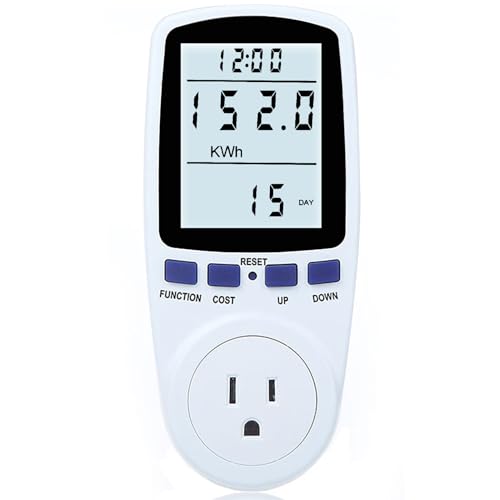
MECHEER PM01 Watt Meter
A single plug-in meter with 7 display modes, overload protection and an adjustable backlight for measuring a single fan.
Pros
- 7 display modes cover power, energy, voltage, current and power factor
- Overload protection shows OVERLOAD on the display
- Backlight time has 5 options, from 10 minutes to always on
- Data memory keeps the last reading when the meter is unplugged or the power fails
Cons
- The 6.5 by 3.3 by 3.0 inch body is the largest of the meters in this group
- No warranty term is stated
- A single meter in the pack, so another appliance needs another meter
- The overload power needs setting to 1800W before use
Detailed Review
The maker lists 7 display modes covering power, energy, volts, amps, hertz, power factor, cost, minimum and maximum power, and cumulative time. Overload protection is stated with a default overload power of 3680W, adjustable from 0 to 3680W, and the maker says to set it to 1800W before using by pressing the function button for more than 3 seconds. The backlit LCD measures 2.36 by 1.85 inches, and the backlight offers 5 time options, from a 10 minute default to always on.
Who it's for: buyers who want a single plug-in meter with overload protection and an adjustable backlight for a single fan. Who should skip it: buyers who want a stated warranty term.
Its Solar Score of 9.6/10 comes from performance 29/35, build 21/25, value 20/25, safety 8/10 and warranty 0/5: 78 of 100 points, placed on our 9.2 to 9.8 scale.
Key Specifications
| Display modes | 7 modes |
|---|---|
| Overload protection | 3680W default, adjustable 0 to 3680W |
| Screen | 2.36 x 1.85 in backlit LCD |
| Size | 6.5 x 3.3 x 3.0 in |
Taken from the seller's listing on 19 November 2026. Capacity and output figures are rated by the manufacturer.
Safety and Warranty
What this listing states. Overload protection with OVERLOAD display warning stated, so safety scores 8 of 10. No warranty term, so warranty scores zero. See How We Pick.
Install it right. Fit shunts, bus bars and fuses within their stated current ratings, follow the wiring order in the manual, and disconnect the battery before you work on any connection.
This is general buying information, not professional advice. Follow each product manual and local rules, and see our Safety Disclaimer.

P3 P4400 Kill A Watt
A plug-in monitor with four settings that counts a fan's use by the kilowatt-hour and works out costs by day, week, month or year.
Pros
- Counts consumption by the kilowatt-hour on a large LCD display
- Works out electricity expenses by the day, week, month, or year
- Compatible with inverters and designed for AC 115-volt appliances
- 1 Year Limited warranty is stated
Cons
- Only four settings, fewer display modes than the other meters here
- The 8.4 by 2.1 by 6.1 inch body is long for a plug-in meter
- Batteries are not included
- Designed for AC 115-volt appliances, so it suits US household outlets only
Detailed Review
The maker lists four settings to monitor electrical use by day, week, month, or year, with a large LCD display that counts consumption by the kilowatt-hour. The monitor is compatible with inverters and designed for use with AC 115-volt appliances. The meter weighs 0.4 pounds, measures 8.4 by 2.1 by 6.1 inches, and the maker states a 1 Year Limited warranty. Batteries are not included.
Who it's for: buyers who want a simple plug-in monitor that totals use by day, week, month, or year without extra display modes. Who should skip it: buyers who want overload protection stated, or who want more than four settings to choose from.
Its Solar Score of 9.5/10 comes from performance 28/35, build 20/25, value 19/25, safety 0/10 and warranty 3/5: 70 of 100 points, placed on our 9.2 to 9.8 scale.
Key Specifications
| Settings | 4, by day, week, month or year |
|---|---|
| Display | Large LCD, counts by kWh |
| Voltage | AC 115-volt appliances |
| Weight | 0.4 pounds |
Taken from the seller's listing on 19 November 2026. Capacity and output figures are rated by the manufacturer.
Safety and Warranty
What this listing states. No current rating or safety listing is stated, so safety scores zero. 1 Year Limited warranty stated. It does not say everything a buyer needs, such as who pays return shipping, so warranty scores 3 of 5. See How We Pick.
Install it right. Fit shunts, bus bars and fuses within their stated current ratings, follow the wiring order in the manual, and disconnect the battery before you work on any connection.
This is general buying information, not professional advice. Follow each product manual and local rules, and see our Safety Disclaimer.
As an Amazon Associate I earn from qualifying purchases.
What to look for in a plug-in watt meter
Display modes are the main thing to compare. More modes mean more figures from a single reading session, and the meters here range from 4 settings on the P3 to 9 display modes on the HBN, with 7 and 8 modes on the MECHEER meters. A backlit display matters when the outlet sits behind furniture: the MECHEER meters offer 5 backlight time options, while the HBN backlight turns off after 15 seconds of inactivity.
| Meter | Display modes | Pack | Overload protection | Amazon |
|---|---|---|---|---|
| HBN Watt Meter 2 Pack | 9 modes | 2 Pack | Not stated | View on Amazon |
| MECHEER Watt Meter 2 Pack | 8 modes | 2 Pack | 3680W default | View on Amazon |
| MECHEER PM01 Watt Meter | 7 modes | 1 Pack | 3680W default | View on Amazon |
| P3 P4400 Kill A Watt | 4 settings | 1 Pack | Not stated | View on Amazon |
Pack size is the next call. A 2 pack covers another fan or another appliance, while a single meter suits the fan it plugs into. The HBN and MECHEER 2 packs hold 2 meters, and the MECHEER single and the P3 hold 1 meter each. For sizing the fan itself, see how to choose ceiling fan size, and for the wider backup picture, see the power stations guides.
FAQ: power away from the grid
How do you measure how much energy a ceiling fan uses?
Plug a watt meter into the outlet, plug the fan into the meter, and read watts for the draw and kilowatt-hours for the energy used over time. The data memory keeps the figure when the meter is unplugged or the power fails.
What does a plug-in watt meter show?
The meters here show power in watts, energy in kilowatt-hours, volts, amps, hertz, power factor and cost. The HBN covers 9 display modes, the MECHEER 2 pack covers 8 and the MECHEER single covers 7, while the P3 counts by the kilowatt-hour.
Do these meters keep the reading after a power cut?
Yes. The MECHEER meters record the data when the meter is removed from the socket or the power fails, and the HBN stores non-real-time data through a sudden power outage.
Can a watt meter measure more than a ceiling fan?
Yes. These meters plug in between any household appliance and the outlet, and the HBN and MECHEER 2 packs hold 2 meters for another appliance.
Related solar guides
See the best watt meters, how to choose ceiling fan size, the best 12V fans for an off-grid cabin and every power stations guide.